Proportion
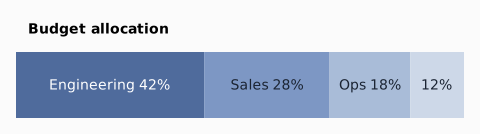
Percentage sizing: a width/height given as "42%" resolves against the parent's definite inner size on that axis (the same definiteness gate as grow and fr). The column fills the canvas width, the row stretches to it, and the segments take their share of that definite width, so they tile it exactly (42 + 28 + 18 + 12 = 100). Against an indefinite parent a % falls back to content. % applies in row / column / stack, and to a grid child against its own cell; grid TRACKS use fr instead.
Result
Source examples/proportion.svgn
<diagram width="480" padding="16" background="#fbfbfb" theme="light">
  <!-- Percentage sizing: a width/height given as "42%" resolves against the
       parent's definite inner size on that axis (the same definiteness gate as
       grow and fr). The column fills the canvas width, the row stretches to it,
       and the segments take their share of that definite width, so they tile it
       exactly (42 + 28 + 18 + 12 = 100). Against an indefinite parent a % falls
       back to content. % applies in row / column / stack, and to a grid
       child against its own cell; grid TRACKS use fr instead. -->
  <column gap="10" align="stretch">
    <text text-align="left" font-weight="600">Budget allocation</text>
    <row gap="0" align="stretch" height="66">
      <box width="42%" fill="#4f6b9c" color="#ffffff" rx="0">Engineering 42%</box>
      <box width="28%" fill="#7d97c4" color="#1b2433" rx="0">Sales 28%</box>
      <box width="18%" fill="#a9bcd8" color="#1b2433" rx="0">Ops 18%</box>
      <box width="12%" fill="#cdd8e8" color="#1b2433" rx="0">12%</box>
    </row>
  </column>
</diagram>