Shapes
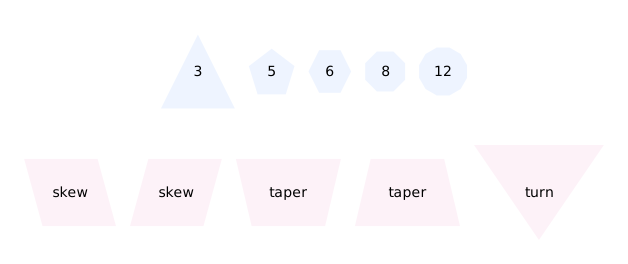
<polygon> describes its outline instead of naming it. sides is what a polygon is; skew, distortion and orientation lean, taper and turn it. Every one of these is a PolygonMark like the built-ins, so connectors clip to the outline rather than to the bounding box.
Result
Source examples/shapes.svgn
<diagram padding="24" background="#ffffff" theme="light">
  <!-- <polygon> describes its outline instead of naming it. `sides` is what a
       polygon is; `skew`, `distortion` and `orientation` lean, taper and turn it.
       Every one of these is a PolygonMark like the built-ins, so connectors clip
       to the outline rather than to the bounding box. -->
  <style>
    .n { fill: #eef4ff; stroke: #7aa3dd; }
    .t { fill: #fdf2f8; stroke: #e9a8c9; }
  </style>

  <column gap="26">
    <row gap="14">
      <polygon class="n" sides="3" aspect="1">3</polygon>
      <polygon class="n" sides="5" aspect="1">5</polygon>
      <polygon class="n" sides="6" aspect="1">6</polygon>
      <polygon class="n" sides="8" aspect="1">8</polygon>
      <polygon class="n" sides="12" aspect="1">12</polygon>
    </row>
    <row gap="14">
      <polygon class="t" sides="4" skew="-0.5">skew</polygon>
      <polygon class="t" sides="4" skew="0.5">skew</polygon>
      <polygon class="t" sides="4" distortion="0.5">taper</polygon>
      <polygon class="t" sides="4" distortion="-0.5">taper</polygon>
      <polygon class="t" sides="3" orientation="180">turn</polygon>
    </row>
  </column>
</diagram>