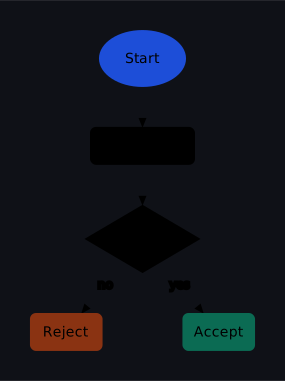
Styled
Re-theme the whole diagram by overriding the palette variables in ONE place; role classes (accent/good/warn) handle individual nodes. (A plain diagram with no <style> also adapts to dark mode automatically, via the built-in @media prefers-color-scheme rule.)
Result
Source examples/styled.svgn
<diagram padding="30" background="#0f1117">
  <!-- Re-theme the whole diagram by overriding the palette variables in ONE
       place; role classes (accent/good/warn) handle individual nodes. (A plain
       diagram with no <style> also adapts to dark mode automatically, via the
       built-in @media prefers-color-scheme rule.) -->
  <style>
    svg {
      --sv-node-fill: #1b2030;  --sv-node-stroke: #3b4256;
      --sv-text:      #e7ebf3;  --sv-edge:        #6b7280;
      --sv-muted:     #cbd5e1;  --sv-halo:        #0f1117;
    }
    .accent { fill: #1d4ed8; stroke: #60a5fa; }
    .good   { fill: #0b6b53; stroke: #34d399; }
    .warn   { fill: #8a3312; stroke: #fb923c; }
  </style>

  <column gap="40" align="center">
    <ellipse id="start" class="accent" label="Start"/>
    <rect    id="read"               label="Read input"/>
    <diamond id="check"              label="Valid?"/>
    <row gap="80">
      <rect id="bad" class="warn" label="Reject"/>
      <rect id="ok"  class="good" label="Accept"/>
    </row>
  </column>

  <connect from="start" to="read"/>
  <connect from="read"  to="check"/>
  <connect from="check" to="ok"  label="yes"/>
  <connect from="check" to="bad" label="no"/>
</diagram>